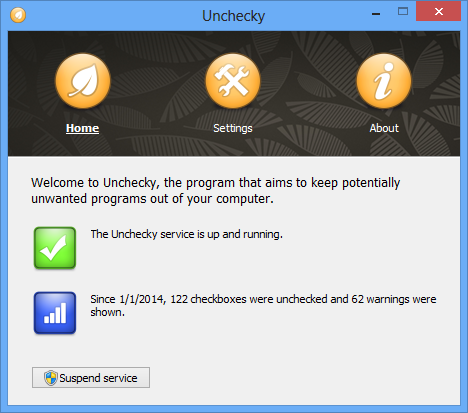
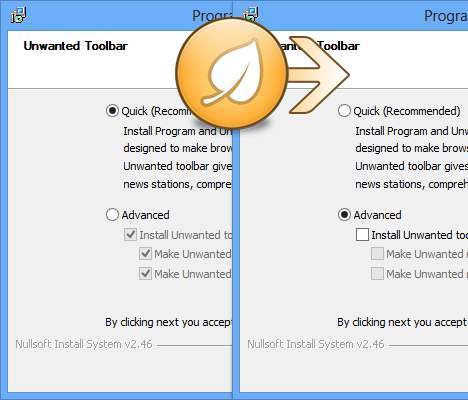
Unchecky v0.2
Version 0.2 of Unchecky was just released!
The main and most visible change is the new interface of the main Unchecky program.
Version 0.2 of Unchecky was just released!
The main and most visible change is the new interface of the main Unchecky program.
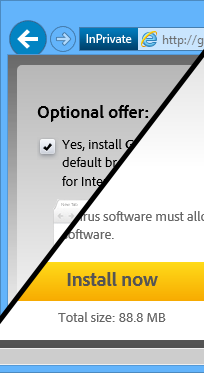
About two weeks ago I introduced the Unchecky program. In this period of time, Unchecky was translated to 8 languages, the Unchecky website was translated to 3 languages, Unchecky was reviewed by numerous well-known websites, and I’ve received lots of positive feedback.
But Unchecky has one important limitation, which was raised right after Unchecky was released – It can’t handle the web. While most programs present their offers in the installation process, some are showing a checkbox in the browser, before downloading. And obviously, this checkbox is checked by default.
Read More…
Nowadays it’s a reality that many software installations are bundled with potentially unwanted programs, such as toolbars or scareware system cleaners. If you’re a power user, you probably know that you have to be very careful while installing software, because if you miss a checkbox you might spend hours afterwards cleaning up the mess. If you’re an average PC user, you possibly leave everything by default, thus installing lots of additional unwanted programs without even knowing it.
I always thought that it’s wrong to provide these potentially unwanted programs by default, but the reason for this is clear: the more users install these, the more money the setup owner makes, usually at the expense of your privacy. Well, it doesn’t have to be that way anymore, thanks to Unchecky!
7+ Taskbar Tweaker v4.4 is out.
New option: Hide the Start button.
The option works for Windows 7 and Windows 8.1.
To open the Start menu in Windows 7, you can click on the corner where the Start button was located.
To open the Start screen in Windows 8.1, you can click the lower-left corner of the screen.
Before

After

New option: Show Start menu/Start screen by double/middle clicking on the empty space.
7+ Taskbar Tweaker allows you to assign an action to double middle clicking on the empty space of the taskbar.
Now there’s one more option to choose from.
Advanced Options Editor.
Read More…
7+ Taskbar Tweaker v4.3 is out, which finally introduces support for Windows 8.1.
In addition, the new version contains some bug fixes and small improvements, so it’s a recommended update even for non-Windows 8.1 users.
MinHook is a Windows API hooking library originally written by Tsuda Kageyu.
It’s probably the best free WinAPI library out there which supports both x86 and x64.
But it’s not perfect, and didn’t completely fit my needs, so I created a fork on GitHub which addresses some of its limitations.
Below you’ll see how the fork improves upon the original MinHook library.
Read More…
This article was written by Mr. eXoDia about the usefulness of the Multiline Ultimate Assembler Library, which is a (dis)assembler library with similar functionality to the Multiline Ultimate Assembler OllyDbg plugin.
Kudos to him!
The Multiline Ultimate Assembler Library
 Multiline Ultimate Assembler library.zip (525.6 kB)
Article files (with the library included)
multi_asm_lib_test.zip (116.81 kB)
Alright, so what’s the use of the Multiline Ultimate Assembler Library? In my case it was useful as backend for a ‘generic’ API hooking tool. The tool was used to hook various APIs to prevent CRC checks and then the idea was to hook an API (VirtualProtect for example) that was accessed just before the OEP of the protected file was reached.
In our case we will not deal with a real protector, but just with a simple file that mimics a protector. Our protected file must have VirtualProtect in the import table.
Read More…
Here is an experimental version of 7+ Taskbar Tweaker which mostly works on Windows 8.1 Preview:
Removed. 7+ Taskbar Tweaker now officially supports Windows 8.1.
Options that currently do not work:
So, why did the options above stop working? Not much was changed about the taskbar in Windows 8.1, after all.
Short answer
Because Microsoft uses better code optimization, it became more difficult to control the code functionality.
Long answer
Read More…
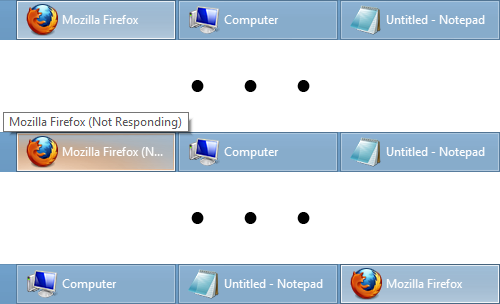
Did the above ever happen to you?
I sometimes encounter the issue, which is not critical, but may be very annoying at times.
I’ve also received a couple of bug reports about it, so I decided to take a closer look.
Read More…
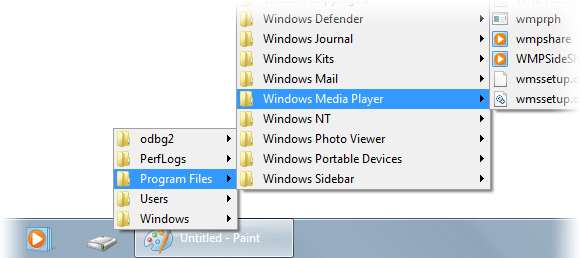
Quick Folder Menu is a tiny application that opens a menu of the folder you specify as a command line parameter.
It’s mostly based on an AutoIt script by LarsJ.
It has a couple of bugs I don’t know how to fix, e.g. it doesn’t always close when you click away (Update: fixed in v1.1).
I hardly know how it works at all. But it works, and I find it handy, so in case you might make use of it, grab it below.
qfmenu.zip (7.34 kB)
Latest version: v1.3
The source code is available on GitHub.