Windhawk v1.7: Pre-compiled mods and more
Introducing version 1.7 of Windhawk, the tool that aims to make it easier to customize Windows and programs.
Pre-compiled mods
Windhawk now downloads pre-compiled mods by default instead of compiling them locally, significantly speeding up mod installations and updates. The mods are compiled and hosted on GitHub.
This new functionality is optional and can be disabled in the settings.
Mod version selection
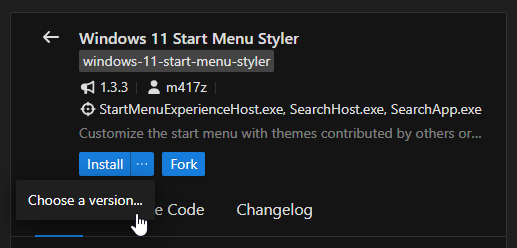
Windhawk v1.7 adds support for viewing and installing older mod versions.
Settings: Textual mode
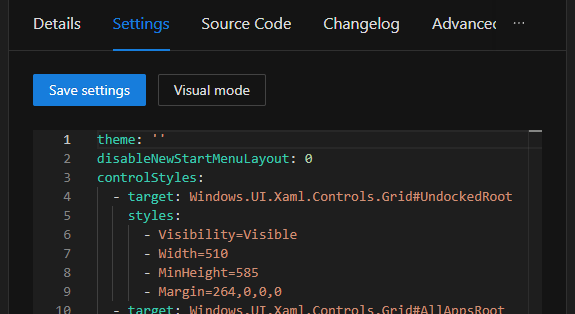
The settings can now be viewed and edited in either visual mode (as usual) or textual mode. Textual mode displays settings in YAML, making it easier to manage mods with many options, like Windows 11 Start Menu Styler and other styler mods.
More user interface improvements
This update brings several improvements to the Windhawk interface: search and filter installed mods, see mod metadata in Explore view, navigate faster with keyboard and mouse shortcuts, zoom in/out, view custom process lists at a glance, and more, all making mod management quicker and more intuitive.
Other improvements and bug fixes
For the complete list of changes in the new Windhawk version, check out the changelog.
Getting the new version
You can get the new version here.
P.S. Windhawk v1.6.1 digital signature
tl;dr Windhawk v1.6.1 could be blocked by Windows with a message that says “This app has been blocked for your protection”. Updating to Windhawk v1.7 should resolve this. More details below.
On October 25, I received two emails from Microsoft, one after the other, with the following titles:
- Alert: Trusted Signing certificate misuse/abuse investigation
- Alert: Your Trusted Signing certificate has been revoked
These emails came as a surprise. Windhawk hasn’t fundamentally changed how it works since its first release.
Shortly after, users began complaining that Windows wouldn’t allow running any of the Windhawk processes with administrator privileges. An error message with the title “This app has been blocked for your protection” appeared instead, offering no straightforward way to continue:
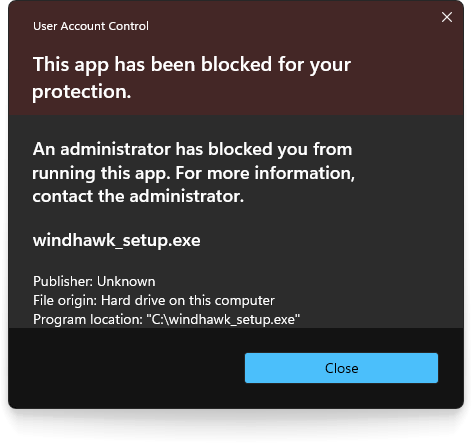
That prevented standard operations such as installation, running, and uninstallation. A GitHub issue was created and some workarounds were suggested. Eventually, I replaced the download link on the website with Windhawk v1.6 which luckily wasn’t impacted.
Microsoft confirmed the block was intentional, with reasons that I consider unjustified. Here are a couple of notable excerpts:
- “We observed activity that could introduce risk to Microsoft customers.”
- “The software seems to intentionally perform process injection which can be abused and in turn poses risk for users of Windows OS.”
Justified or not, I had to accept that the signature had been revoked. Eventually, I purchased a digital signature from another vendor. Windhawk v1.7 is properly signed again, and I hope that this won’t be an issue again in the future.
Windhawk update to v. 1.7 does not work for me :((
No error message – just a black window
What’s your current Windhawk version? v1.7 or the latest v1.7.3? Try to update to the latest version, v1.7.3, and let me know if you still have issues.
current I have version 1.61 (installed portable) and I get the message that a new version is available.
For update I got on your website and download file “windhawk_setup.exe” (nothing other is available)
After setup, the program starts and nothing is happend.
After reboot my system the program starts and the old version 1.6.1 is back…
Maybe that I’m doing something wrong?
What options did you select in the installer? You should select the portable version, and then select the folder where your existing Windhawk version resides.
If you can post a video recording of the process, that might provide some clues about the issue.
windhawk cannot oppened for me its says “cant connext network” even tho i have a good wifi or signal there, so how the conclusion?
A similar issue is discussed here:
https://github.com/ramensoftware/windhawk/issues/759
See if any of the comments help. If not, and if you think that you’re seeing a different issue, please create a new issue.
I just wanted to pop in briefly to say thank you. Thanks to Windhawk and Preher (7TBT), Windows is actually usable for me now.
Well done for the great work!