MUltimate Assembler v1.7
Meet MUltimate Assembler v1.7!
New in this version:
RVA (relative virtual) addresses
Read More…
Meet MUltimate Assembler v1.7!
New in this version:
RVA (relative virtual) addresses
Read More…

This utility has been designed for speech recognition users who use voice macros to switch between open applications and tray icons. It works on Windows 7, Windows 8, and Windows 10 operating systems, both 32-bit and 64-bit.
For example, speech recognition users that use Dragon NaturallySpeaking Professional with the third-party provided Utter Command add-on can switch to the third application shown in the taskbar by using the command “Window 3”, or can right-click on the third visible tray icon by using the command “Tray 3”. When there are many open applications, or when the user has a significant amount of tray icons, it can become quite cumbersome to count by hand the number of icons in order to identify the sequence of the intended application or tray icon.
“7+ Taskbar Numberer” solves this problem by numbering sequentially, left to right:
– the icons for the open and close-but-pinned windows applications.
– all the visible tray icons.
and then placing tiny visible numbers (a.k.a. “hints”) in the top left corner of the application icons, and in the top right corner of the tray icons. The numbering scheme supports more than one digit, so that the hint for the 12th application is “12”.
While this utility has been tested with the Utter Command user interface, it will work with any other voice macros that select open applications or tray icons by rotating with them sequentially from left to right.
The utility adjusts dynamically as new applications or tray icons are added, and also works when the user has chosen to make just a subset of the tray icons visible.
This above “Speech recognition” section wasn’t written by me. The author wished to remain anonymous.
You can use the Windows key+number keyboard shortcut to refer to a taskbar item.
Windows logo key
+number
Start the program pinned to the taskbar in the position indicated by the number. If the program is already running, switch to that program.Shift+Windows logo key
Start a new instance of the program pinned to the taskbar in the position indicated by the number.Ctrl+Windows logo key
Switch to the last active window of the program pinned to the taskbar in the position indicated by the number.Alt+Windows logo key
Open the Jump List for the program pinned to the taskbar in the position indicated by the number.
Source: Microsoft.
7+ Taskbar Numberer adds numbers to your taskbar items, so you can see right away what keyboard shortcut is assigned to each item.
Optionally, the numbers can appear only when the Windows key is down.
7+ Taskbar Numberer adds numbers to your combined items on the taskbar, similarly to the way Windows XP did:

Optionally, you can use this option, but show Win+# keyboard shortcuts when the Windows key is down.
In the previous post I’ve introduced an experimental 7 Taskbar Tweaker version for Windows 8. It had a number of flaws, and didn’t support Windows 8’s multiple taskbars.
Here is a new experimental version, with all of these flaws resolved (portable version):
Windows 8 version is stable now, get it here.
Please report any issue that you encounter.
Remember that this version is designed for Windows 8 Release Preview only, and would not work as expected on earlier builds of Windows 8. It should work well on Windows 7, though.
P.S.: I think about renaming the tweaker to 7+ Taskbar Tweaker. What do you think?
I’ve been working on Windows 8 support for 7 Taskbar Tweaker lately. It’s not ready yet, but mostly usable, so I decided to make an early experimental release.
This version is designed for Windows 8 Release Preview only, and would not work as expected on earlier builds of Windows 8. It should work well on Windows 7, though.
Read More…
The new version of Resource Hacker FX partially supports Unicode.
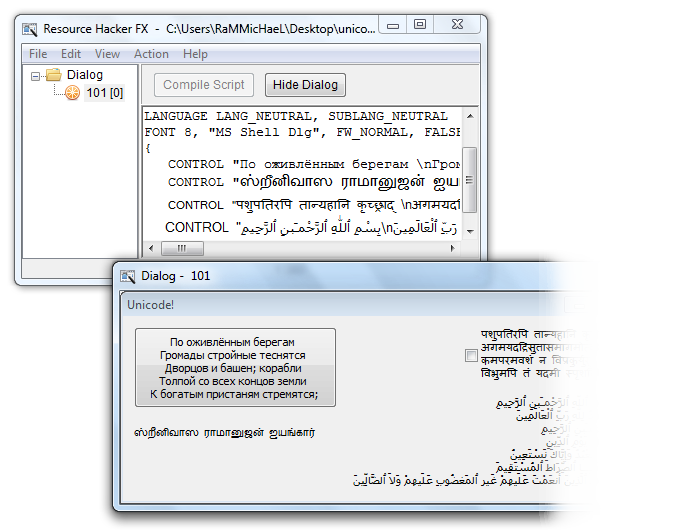
What’s supported:
What’s not supported:
Everything else, including:
7 Taskbar Tweaker v3.3 is out.
7 Taskbar Tweaker v3.2 is out.
What’s new:
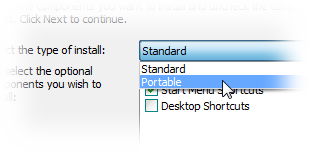
MUltimate Assembler (the OllyDbg plugin) v1.6 is out.
A small release with basically one new option: You can choose how the plugin generates new labels.
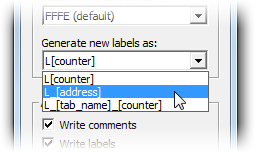
Also, this release includes a version for Immunity Debugger.
Meet 7 Taskbar Tweaker v3.1!
New in this version:
Read More…
 +number