Quick Folder Menu
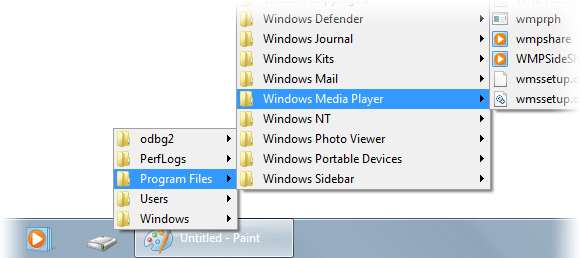
Quick Folder Menu is a tiny application that opens a menu of the folder you specify as a command line parameter.
It’s mostly based on an AutoIt script by LarsJ.
It has a couple of bugs I don’t know how to fix, e.g. it doesn’t always close when you click away (Update: fixed in v1.1).
I hardly know how it works at all. But it works, and I find it handy, so in case you might make use of it, grab it below.
 qfmenu.zip (7.34 kB)
Latest version: v1.3
The source code is available on GitHub.
XP support?
Doesn’t it work on XP? It worked the last time I checked.
The menu flashes for a second and then closes
You are right.
That’s because of a hack I’ve added to close the menu on focus loss.
Here’s a version without it, that works on XP:
http://ge.tt/api/1/files/7VeqHUp/0/blob?download
I have trouble closing with Esc
Yeah, as I’ve mentioned in the post above, it has some flaws.
It uses undocumented APIs, and I don’t really know whether I use them correctly, and how to fix issues such as focusing.
It works well enough for me on Windows 8, though.
Thanks for this great utility! I was hoping to use it to create a start menu replacement on Windows 8.1, but it seems that left-clicking on items just closes the menu without opening the item, although right-clicking and choosing “Open” does work. This problem only occurs with Start Menu folders, not ordinary folders.
I tried three different ways of displaying Start Menu/Programs: qfmenu 0x0017, qfmenu Programs.{7BE9D83C-A729-4D97-B5A7-1B7313C39E0A} and qfmenu.exe “C:\ProgramData\Microsoft\Windows\Start Menu\Programs” and all three have the same problem.
Any chance you could make the source code available?
After more investigation, the problem is actually that left clicking on shortcuts doesn’t work, regardless of the folder type. Left clicking directly on an executable does work.
Here you go.
https://github.com/RaMMicHaeL/Quick-Folder-Menu
Good luck fixing it. As stated above in the blog post, I have no idea how it works 🙂
Hi,
I just found Quick Folder Menu and it’s almost perfect for my needs. I was thinking of adding a couple of things like a command switch to only display .lnk or .exe files. I found the link to the source code and it appears to be Visual C. What version was used when it was originally created?
Thanks,
Hi Carl,
The code in the repository was developed using Visual Studio 2012 (can be seen in the solution file), but I believe it will work with other versions, too.
quick q: are the menu’s subject to the same ‘byname’ rule that all windows menus seem subject to?
What do you mean? What is the ‘byname’ rule?
Hi
I’ve been using windows 7’s “My Computer” toolbar in taskbar, but in Windows 8.1, that toolbar has a problem, it loads ALL icons in a folder such as exe icons BEFORE showing that folder and I have to wait for even 10 seconds for a menu to load, so I stopped using it until I found this software:)
Thanks a lot
But it doesn’t open shortcuts:(
shell:sendto
Hi RaMMicHaeL,
I’m looking for a solution to be able to place folders/subfolders in Send To folder, and get them as a cascading menu in Context Menu > SendTo.
Do you know a solution for this (without editing again and again the registry)?
Thanks
I don’t know, sorry.
Thank you.
Could you please let the button aligning with the right Part On the Task bar Is that of the right end of the Window lists.